
General Overview
To make the design process smoother and reduce bureaucracy, a company can decide that drawings and models do not need to go through the entire approval workflow separately. Instead, approvals are applied directly to the related items, since this also allows checking the status of their components. To ensure this information is correctly updated on the drawing, the title block and text macro update function (F5) can be configured to fetch approval data directly from the item. This ensures the title block follows company practices and supports item-centric design.
This feature is available starting from Vertex Flow version 25.0.6.
Read more about product structures: Product Structures
Read about changing object states: Change Object State
Read about approvals: Approve Item and Product Structure
Read about defining workflows: Workflows
Activation
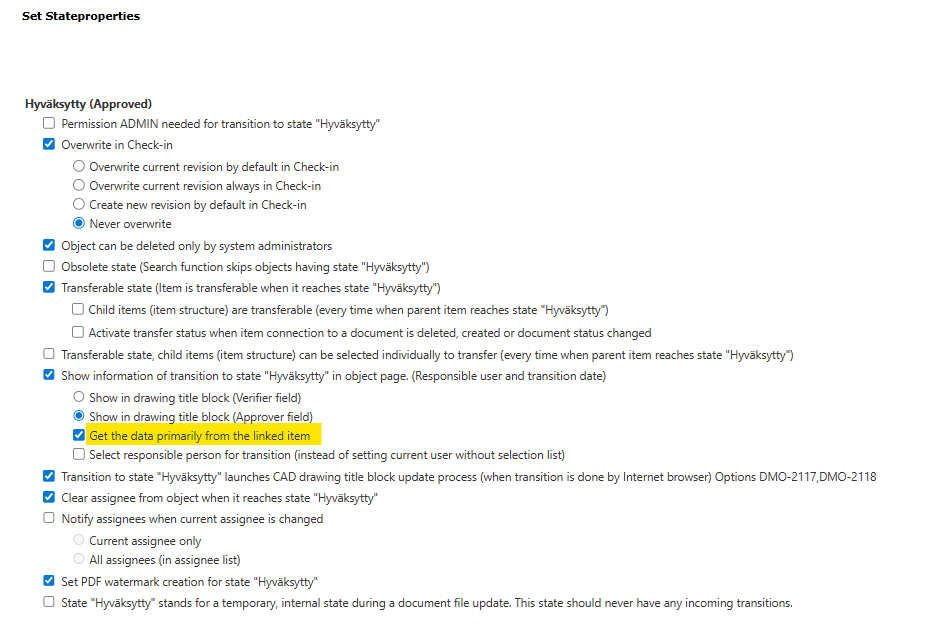
Enable the feature by turning on the state property Get the data primarily from the linked item on the portal page: System Administration > Workflow
Effect on the drawing card
When the feature is enabled, the verifier and approver of the linked item are displayed in the Revision Information section of the drawing card.
Effect on the drawing
When the feature is enabled, the verifier’s and approver’s signatures with dates from the linked item appear in the drawing’s title block. If the item does not have this information or Flow cannot find a unique linked item, the signatures on the drawing are updated according to Flow’s drawing approval data.