
General Information
In Flow, product structures are distinguished based on how they are created. Their symbols also differ.
Standard Item Structure
-
A standard structure is created either by modeling with CAD software (Vertex G4 or SolidWorks), manually building the structure, adding parts to a parts list, or importing the structure from an ERP system into Flow.
-
A standard item structure always changes when any of its components are modified, meaning it always represents the latest version of the structure. This can also be referred to as a design structure.
Individual Structure
-
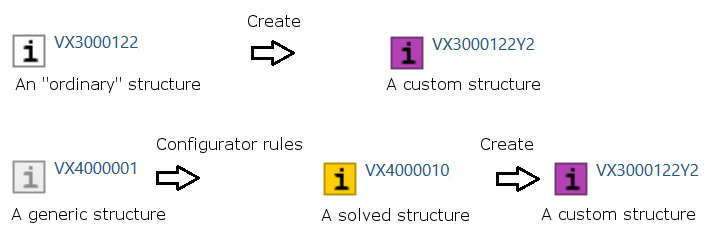
An individual structure can be created from a standard or resolved structure.
-
The structure remains as it was at the time of creation, even if the parts and assemblies within it continue to evolve.
-
See: Creating and Editing Individual Structures
-
Substructure of an Individual Structure
-
The items in an individual structure are marked with a clock symbol, and the main item is marked in purple.
-
See: Creating and Editing Individual Structures
-
Generic Item Structure
-
A generic structure is not definitive, meaning it cannot be delivered as-is.
-
It is specifically created to manage modular products.
-
A generic structure may include interchangeable parts, or parts can be added or omitted during the resolution process.
Resolved Structure
-
A resolved structure is created when a production-ready structure is generated from a generic structure.
-
The resolution is performed using Flow's configurator, which is an additional license option.
-
See: Configuration Example
-
-
The structure can still be customized for specific deliveries.
About Product Structures in General: Product Structures
Evolution of Structures
The adjacent diagram illustrates the development of structures into an Individual Structure.
Generic Item Structure
An item becomes generic if its structure includes rows where:
-
The Variant field has a specified value,
-
The Condition field contains a selection condition (Variant Items),
-
The Consumption or Quantity field has a non-numeric value,
-
Or if the structure includes a component that is itself generic (grey), in which case the parent item automatically becomes generic.