We presented these reforms in the major version 32.0.0 (2026)
New features and improvements for reference grids
The modifications to the reference grid properties remain fully under the user’s control with the latest improvements.
Reference grid improvements
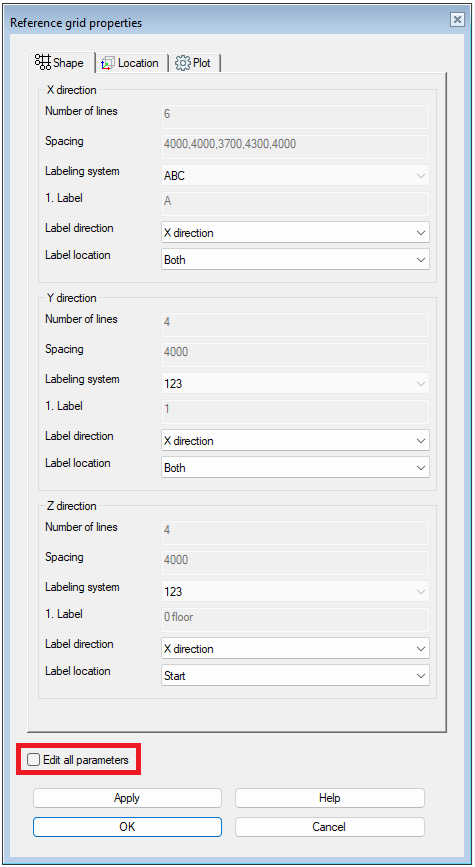
When you modify the reference grid, the system no longer changes all parameters by default. It also no longer rebuilds the entire grid from scratch. This allows manually adjusted annotations and line endpoints to remain unchanged. The same applies when you only adjust annotation directions, annotation positions, or drawing parameters for grid lines and annotations. You can control the parameter editing through the Reference grid properties window. We added the new checkbox Edit all parameters there. With this improvement, users can fully control the appearance of reference grids without the risk of unwanted global changes. (Vertex ID: VXCORE-1208)
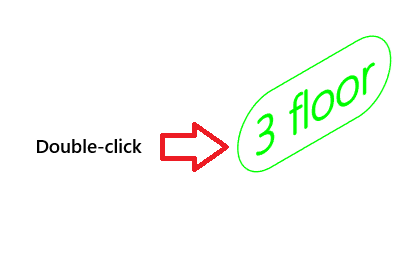
Editing an annotation of the reference grid now always opens the reference grid itself for editing. This ensures that all annotation texts and drawing parameters remain correct. When you double‑click a 3D annotation of the reference grid, or select Properties from the context-sensitive menu, you are now always taken to the Reference grid properties dialog to edit the reference grid. Editing a single annotation is still possible, but only through the Edit one grid lable handle function. You can no longer delete 3D annotations of the reference grid using the Delete key or through the context-sensitive menu. This prevents accidental removal of annotations. With these changes, users retain full control over the appearance of reference grids without the risk of unintended modifications. (Vertex ID: VXCORE-1209)