We presented these reforms in the major version 32.0.0 (2026)
New features and improvements for piping design and libraries
Manage the pipeline life cycle phase more easily and comprehensively with enhanced functionalities compared to before.
We have updated the pipe component database to include the extensive changes introduced to PSK pipe classes in 2025.
Additionally, we have added three new pipe classes PE100-SDR11, PE100-SDR17, and PE100-SDR33 along with their associated pipe components to the pipe component library.
Pipeline life cycle phase
We have redesigned and renamed the tools used to determine whether a routed or existing pipeline is new or old. With the new functionalities, handling the lifecycle phase is significantly easier and clearly more versatile than before. These improvements will reduce the number of human errors, as the information is now explicitly stored in its own field and the tools support its management.
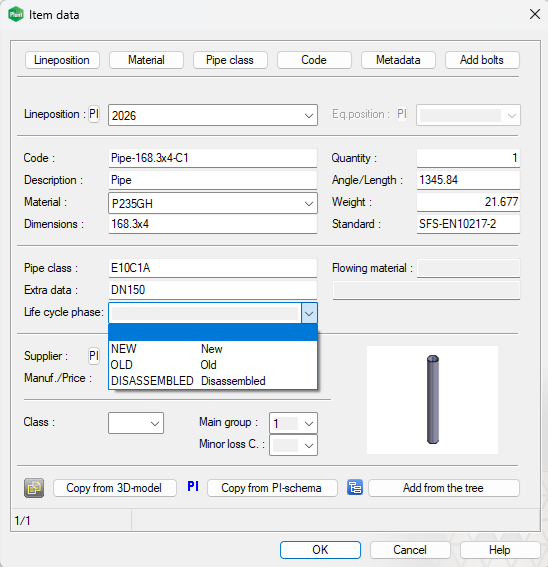
We have added a new field, Life cycle phase, to the pipe component item data, allowing the user to define whether the component is new, old, or to be dismantled. The phase can also remain empty. Previously, this information was entered in the Extra data field. We have also added the new field to the Edit item data of parts and Data of model’s visible parts screens. (Vertex ID: VXPLANT-971)
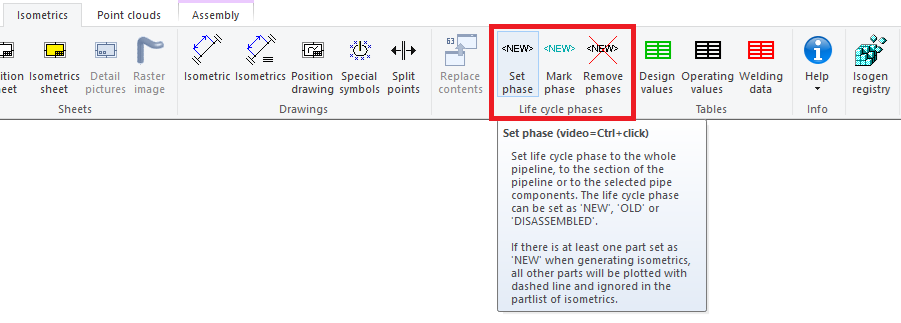
The functionalities are still located under the Isometrics tab, but they now have new names. Set phase now works like other tools related to pipeline handling, meaning the line selection is clear, and the actual actions are performed afterward. Mark phase can now be targeted to the desired phase. Remove phases first marks the pipes for which a phase has been entered and then prompts the user to confirm the removal. (Vertex ID: VXPLANT-1000)
The Life cycle phase can be defined directly during the routing of a pipe, duct, or cable tray line. By default, the phase is empty. (Vertex ID: VXPLANT-489)

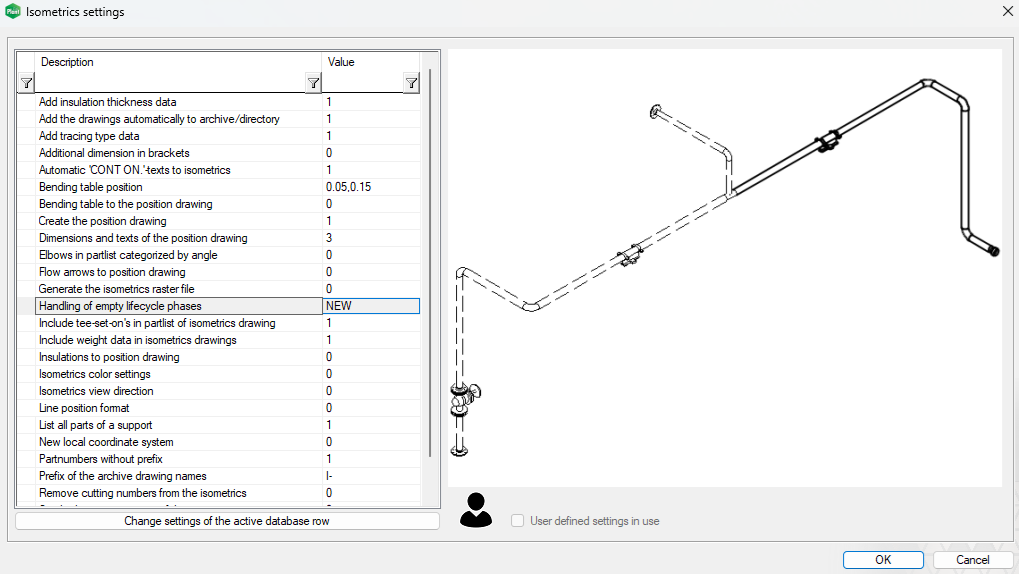
We have added the Handling of empty life cycle phases switch to the isometric settings, which allows you to define how the program handles pipe parts with an empty life cycle phase. By default, the value is NEW. With this setting, you can decide how to manage the phases. For example, you can define only the phases that are fewer and leave the rest empty, in which case this setting will handle the remaining parts to achieve the desired result during the isometric run. (Vertex ID: VXPLANT-975)
Isometric drawing generation has been significantly accelerated
We have greatly improved the speed of isometric drawing generation. The familiar “flashing” of the drawing during isometric creation in previous versions is now history. With this change, you can save your design time for more productive tasks. (Vertex ID: VXPLANT-1233)
Elbows can now be summed by angle in the drawing parts list
You can now list the elbows in the model in the drawing parts list, summed so that their angle is taken into account. This requires that you first define numbering for the parts in the part numbering settings for the summary list to be added to the drawing. During the definition, the program asks whether the elbows should be summed by angle. By answering yes, you will get the elbows in the drawing parts list summed by code and angle when using the output format Parts list summed to drawing for the drawing parts list. By doing so, you may potentially save manufacturing costs by purchasing only one elbow worth 1000 €, for example, for two 30-degree elbows. (Vertex ID: VXPLANT-468)

PSK updates 2025
Updates have been made to PSK pipe classes during 2025. We have updated our pipe component library based on these changes. (Vertex ID: VXPLANT-1124)
Key changes:
-
Dimensional changes for tees and reducers in pipe classes E10H4A and E16H4A.
-
Tee dimensions updated in the following classes: E16F1C, E25F1B, E40F1B, E63C1B, E100C1B, E160C3B, E160C4B, E250C1B, E250C2B, E250C3B, E250C4B, E100H1B, E160H1B, and E160H2B.
-
Radius for elbows DN15 and DN20 updated in almost every PSK pipe class.
-
The numbering of dimension tables for ends, elbows, reducers, and tees has been changed to match the standard SFS-EN 10253-4:2024, meaning we updated the Standard field of pipe parts according to the new tables.
Changes in numbers:
-
New items: 546 pcs
-
Updated items: 878 pcs
-
Obsolete items: 328 pcs
We have compiled a list of the pipe items affected by the above changes. You can download it here: VertexG4Plant2026-PSK_updates_2025.xlsx
We have created an update package for maintaining the pipe component library, which allows you to update the Standard field of obsolete items with the value PSK 2025 REMOVAL. By running the update, you can easily get a list of obsolete items from the pipe component database. You can download the package for the international environment here: UpdatePipeComponents.zip NOTE! This update package works only for updating G4Plant’s local databases. If you are using the Flow system, first update the local G4Plant installation and then use it to create a transfer package for Flow.
Three new thermoplastic pipe classes with components added to the pipe component library
We have added three new pipe classes PE100-SDR11, PE100-SDR17, and PE100-SDR33 along with their related pipe components (450 pcs) to the pipe component library. Components in the PE100 classes can be connected either by butt welding or electrofusion welding. The material PE100 is high-density polyethylene. The new components follow the specifications of the new pipe class standard PSK 6355, and the dimensions are based on the supplier Agru’s product family Agruline. Vertex actively maintains pipe classes defined by PSK, ensuring that our customers always have access to a comprehensive and up-to-date library of piping components. (Vertex ID: VXPLANT-899)
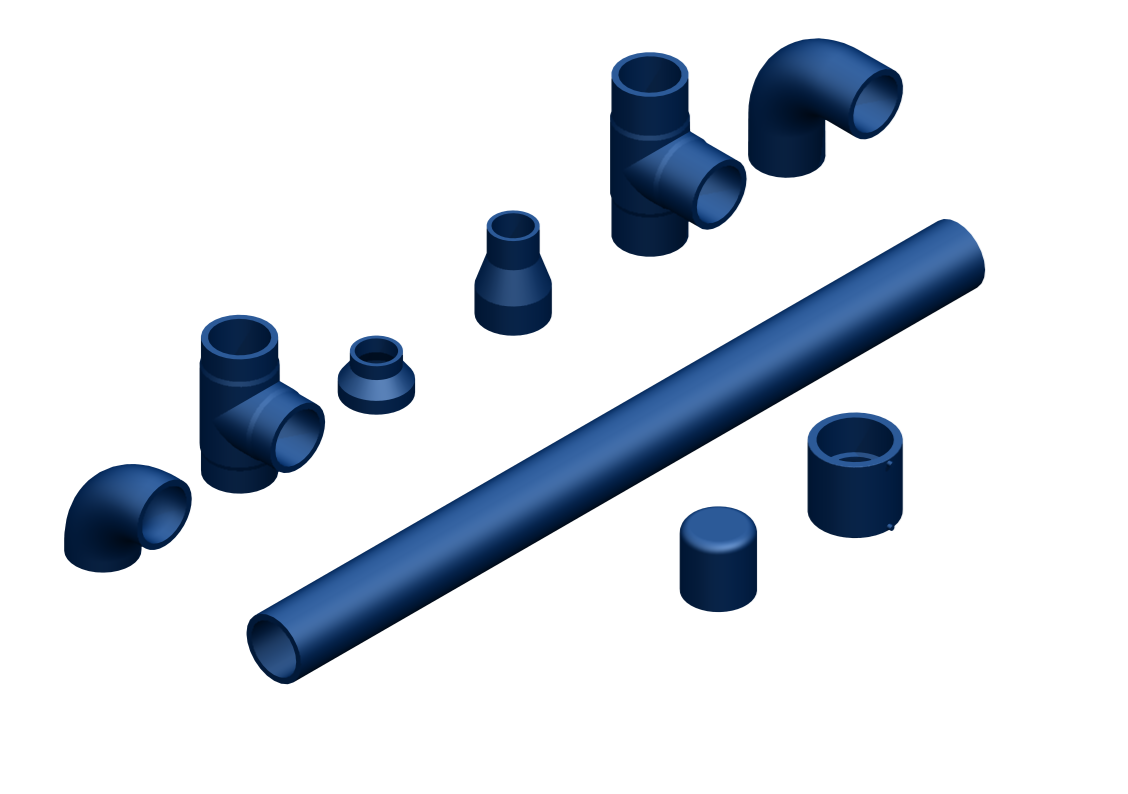
Blind flanges added to the pipe component library for pressure classes PN160 and PN250
We have added blind flanges (104 pcs) to the following pipe classes in the pipe component library: E160C1B, E160C3B, E160C4B, E250C1B, E250C2B, E250C3B, E250C4B, E160H1B, and E160H2B. At the same time, we corrected the thickness of a few blind flanges in class E160C2B and fixed the material of a weld-neck flange in class E160H2B. (Vertex ID: VXPLANT-1172)
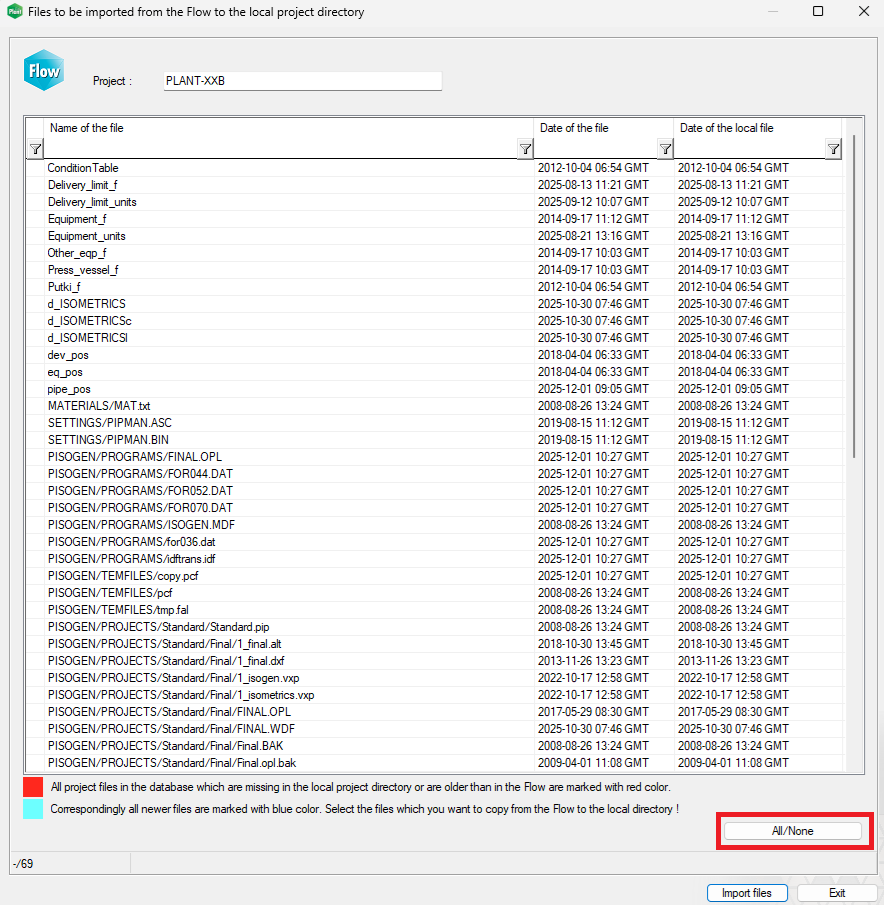
Usability improvements to the Import project files function in Flow usage
We have added a new button All/None to the Import project files screen, which allows you to select all transferable project files at once or clear all selections. Alternatively, you can select all rows using the keyboard command Ctrl + A. This speeds up and simplifies handling numerous rows during the transfer phase when working with Flow. (Vertex ID: VXPLANT-1228)