General
Deleting a document's attachment requires reserving the document for your user account.
Changing an attachment to another file does not require deleting the old attachment.
-
You can replace the main file with a new one when restoring a document.
-
See: Restore Document.
On documents in general: Documents and Their Management
If you delete the main file of a document, Flow will also delete the other attachments of the document, such as PDF preview files.
Delete a Document Attachment
(1) check-out the document using the action Document > check-out and Open.
-
Flow will open the main file, which you can then close.
(2) Click the gear icon in the type field of the attachment you want to delete.
-
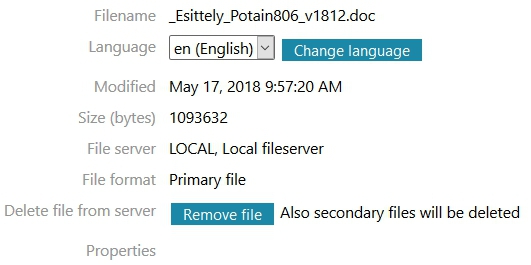
Flow will open a dialog window with File Details.
-
If you have not check-outed the file’s object for your user account, the Delete File button will be grayed out and unavailable.

(3) Select the action Delete File.
-
Flow will ask for a confirmation.
(4) Select OK if you want to delete the attachment, or
-
Select Cancel if you do not want to delete the attachment.
-
Flow will delete the file and its possible alternative file formats.
(5) Restore the object reservation using the action Document > Restore.